
macOS Platform SSO and Kerberos: Entra Registration, Browser Access and AD File Shares

Actualizado: hace 6 días
Estimated reading and study time: 40–55 minutes. Allow time to review 43 slides, inspect the evidence and absorb the concepts. This estimate excludes reproducing the procedures and waiting for installation, synchronization or policy delivery.
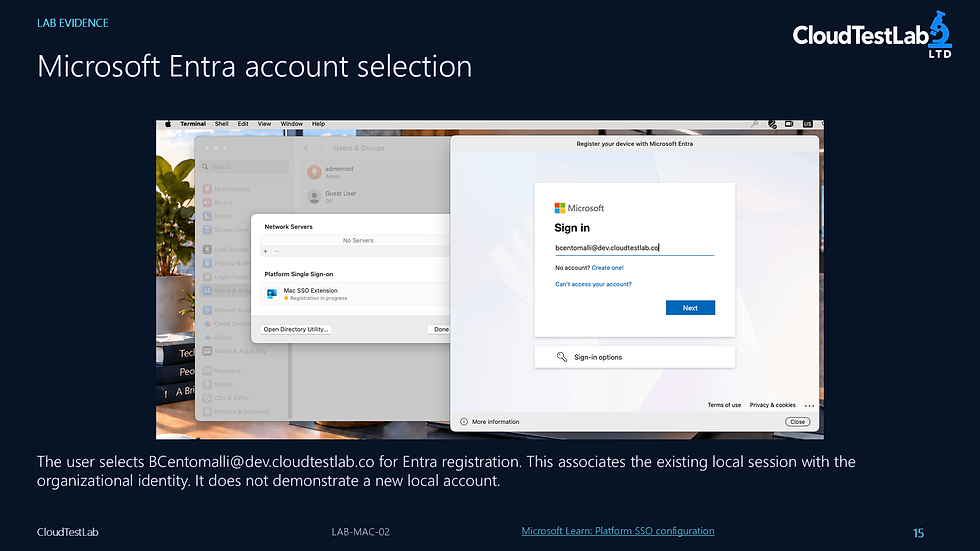
LAB-MAC-02 follows password-based Microsoft Entra Platform SSO registration on an Intune-enrolled Mac, then examines browser access and Kerberos access to an Active Directory file share. Read it as a sequence of separate checks: delivery of the configuration, device and user registration, browser authentication, ticket acquisition and access to the share.
The walkthrough distinguishes policy delivery from completed registration and cloud SSO from the initial AD domain sign-in. Conditional Access results are examined, but enforcement of a require-compliant-device control is not established. Successful SMB access should be interpreted alongside the Kerberos evidence rather than attributed to Platform SSO alone.
Related learning: For the enrollment foundation, read the Direct Enrollment conceptual guide and compare LAB-MAC-01: MDM enrollment and policy validation. These explain how the Mac becomes managed; this lab examines the additional identity and access steps.
Official documentation: Use Microsoft’s Platform SSO configuration guide, Apple’s Platform SSO explanation and Kerberos SSO extension guidance to compare prerequisites and authentication behavior.




Comentarios